Integrations
SMTP Integration Built to Power Every Automation, Not Just One Email
Connect your own SMTP server and every email AISalesQ sends (quiz results, subscriber follow-ups, and full automation sequences) goes out through your provider, under your domain, with your sender reputation.
Free plan available · No credit card · 14-day trial on paid plans
Reputation
Why the Sending Server Matters
Email providers like Gmail, Outlook, and Yahoo check the sending server—not just the message—before deciding where it lands. To establish trust, they run automated background checks against your domain's DNS settings to ensure the email is legitimate.
The Shared Server Risk
When a quiz app sends every merchant's emails from its own shared servers, your delivery depends on that shared server's reputation, not yours. A spam complaint from another store on the same server can affect your inbox placement. A rate limit hit by high volume elsewhere can slow your sends down.
The SMTP Solution
SMTP integration isolates your store from the shared risk of sending alongside other merchants, where a single stranger's spam complaint can damage your deliverability. By routing emails through your own provider, you protect your domain's reputation and ensure your inbox placement is determined solely by your own sending history, not someone else's mistakes.
The Shared Server Risk
When a quiz app sends every merchant's emails from its own shared servers, your delivery depends on that shared server's reputation, not yours. A spam complaint from another store on the same server can affect your inbox placement. A rate limit hit by high volume elsewhere can slow your sends down.
The SMTP Solution
SMTP integration isolates your store from the shared risk of sending alongside other merchants, where a single stranger's spam complaint can damage your deliverability. By routing emails through your own provider, you protect your domain's reputation and ensure your inbox placement is determined solely by your own sending history, not someone else's mistakes.
How it works
How SMTP Integration Works
Enter Credentials
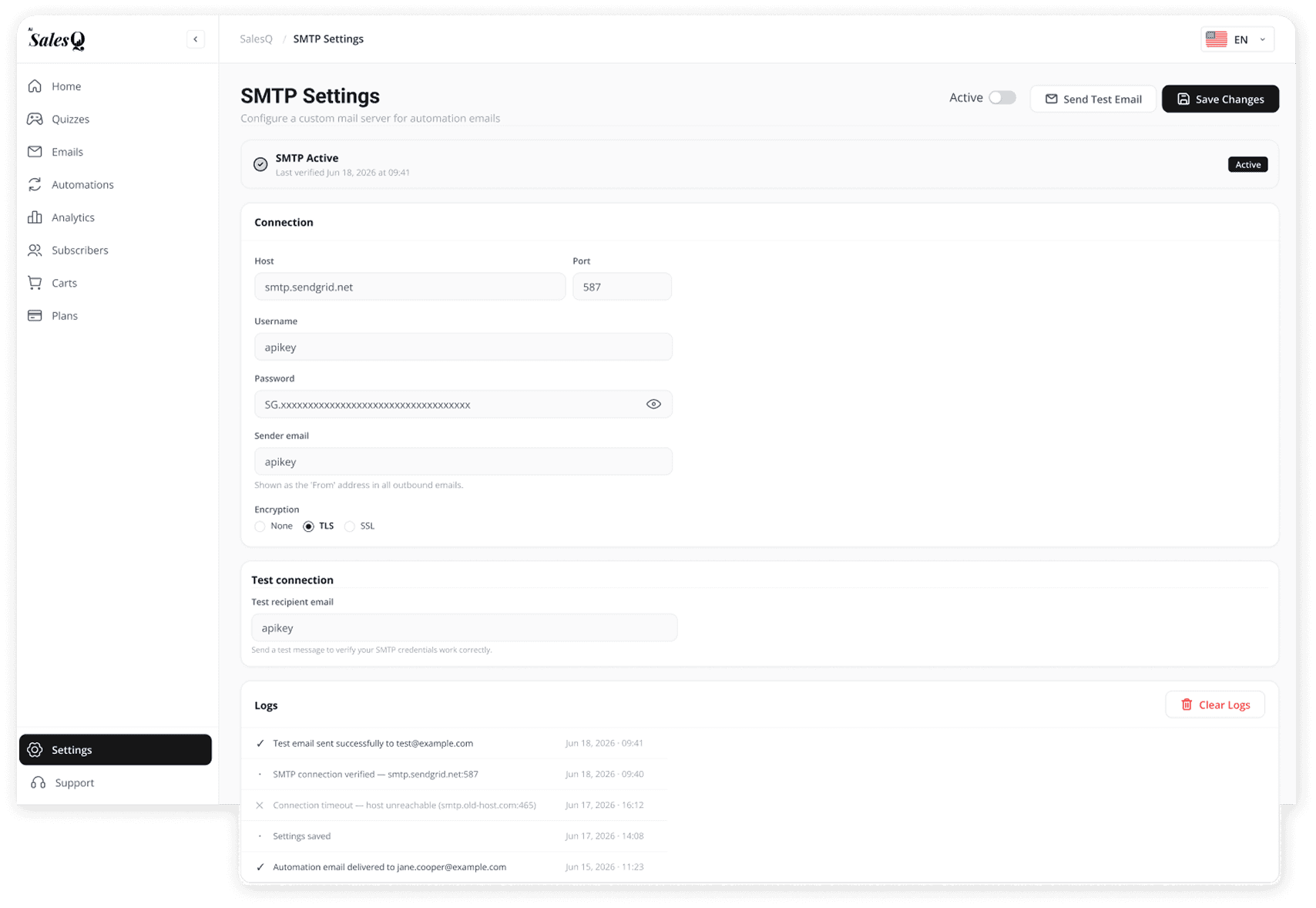
Input the host, port, username, sender email, password, and encryption type—the same details your email provider already gives you.
Outcome
Connect your custom sending domain.
01
Send Test
Choose any recipient, type in their email address, and confirm the message actually arrives in their inbox to test the credentials before anything goes live.
Outcome
Verify deliverability before launching.
02
Activate Connection
A successful test automatically marks the connection verified, records the timestamp, and instantly shifts the entire system into an active status.
Outcome
Instantly take your integration live.
03
Route Every Send
Quiz results, automation sequences, and future test sends all route through this single, secure channel automatically until you decide to modify it.
Outcome
Power your entire email system.
04
Enter Credentials
Input the host, port, username, sender email, password, and encryption type—the same details your email provider already gives you.
Outcome
Connect your custom sending domain.
01
Send Test
Choose any recipient, type in their email address, and confirm the message actually arrives in their inbox to test the credentials before anything goes live.
Outcome
Verify deliverability before launching.
02
Activate Connection
A successful test automatically marks the connection verified, records the timestamp, and instantly shifts the entire system into an active status.
Outcome
Instantly take your integration live.
03
Route Every Send
Quiz results, automation sequences, and future test sends all route through this single, secure channel automatically until you decide to modify it.
Outcome
Power your entire email system.
04
Setup & verification
Setup Is a Form, Verification Is Proof
Entering credentials takes a few minutes, but a saved form is not the same as a working connection.
Verification Over Guesswork
After saving, trigger a live handshake. Run a test send and get real-time status verification. No guessing if your settings work.
Status
Verified (Updated just now)
01
Actionable Errors If Failed
See exactly what went wrong with specific error messages like "Error 535: Authentication failed - Invalid password." No generic errors.
Diagnostic
Direct error logs pinpoint exact credential mismatches.
02
Flexible Control
Toggle off to pause without clearing saved credentials. Your settings remain secure while you troubleshoot. Status shows active/paused states.
Control State
Paused (Saved securely)
03

Error handling
What Happens If Something Breaks
Real-time error surfacing
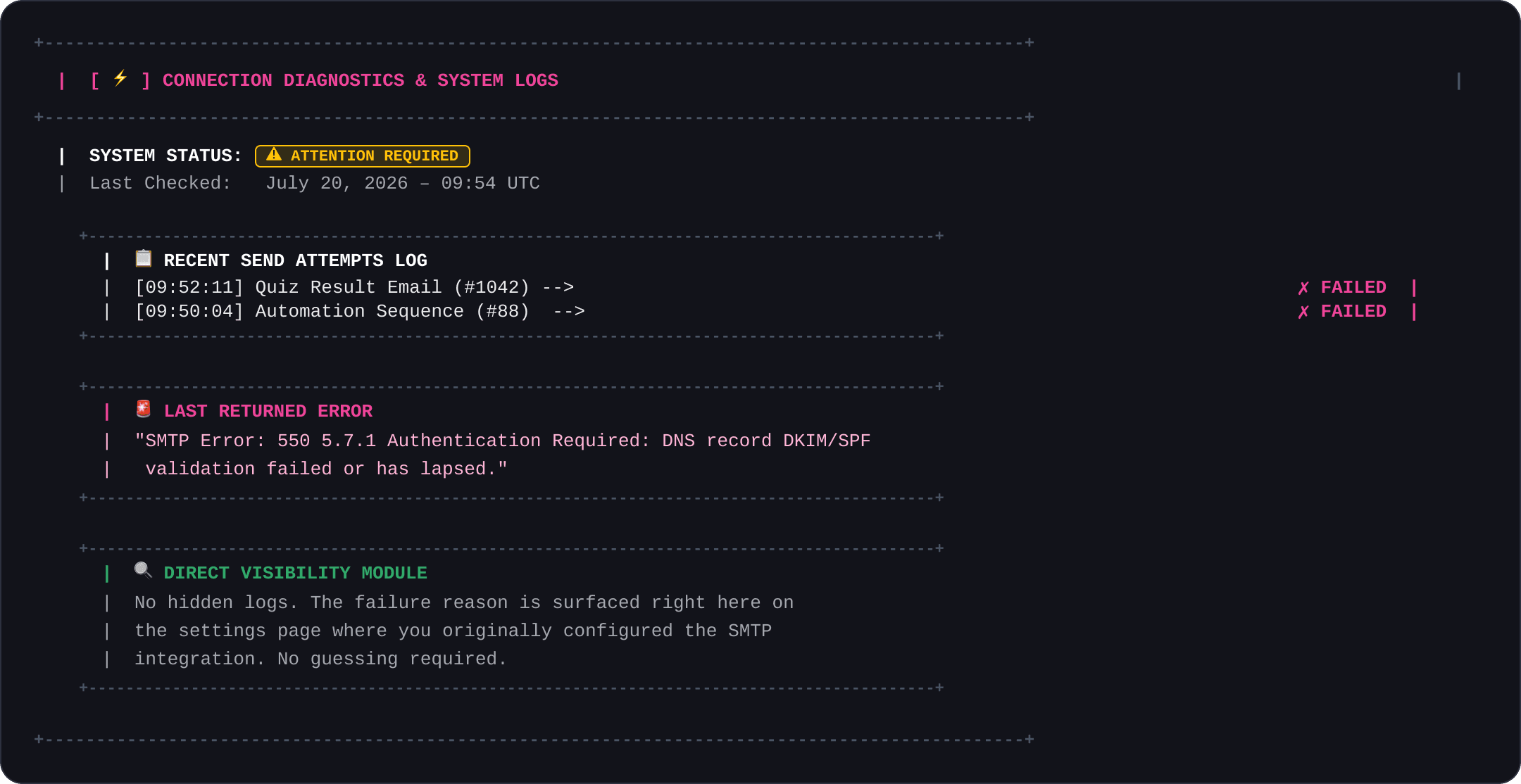
Immediate alerts notify you if authentication expires or DNS handshakes collapse so you stay fully informed.
Exact SMTP error codes
Full diagnostic payloads with server response codes are output directly without clipping or masking.
Zero log hunting
Integrated directly with your primary dashboard page so there is no need to query external databases or query files.
COMMON QUESTIONS
The questions merchants ask before they install.
If something is stopping you from clicking install, the answer is probably here.
No. You need the SMTP credentials your email provider gives you, which usually appear in that provider's own account settings. Entering them into AISalesQ is filling in a form, not writing configuration files.
You can use any SMTP-capable email provider—SendGrid, Mailgun, Amazon SES, Postmark, or even your domain's own email host. Most offer a free tier that's more than enough for a Shopify store's automation volume.
No. Shopify still sends its own transactional emails—order confirmations, shipping updates—through its own system. Your SMTP connection only powers the emails AISalesQ sends: quiz results, follow-ups, and automation sequences.
Yes. Update the credentials in Settings and send a test—your automations, sequences, and templates stay exactly as they were. Only the sending server changes.
Have a question that isn't answered here?
Contact the AISalesQ team directly
READY TO LAUNCH
Ready to see AISalesQ in action?
You've seen how it works. Now start the 45 minutes that runs forever. The quiz builder is waiting. Your Shopify catalog is already synced. Start Step 1.
Free plan included · No credit card needed · Live in 15 minutes